


Adventure Academy
4.48.90K Reviews
App Specs
- Version
- 1.065.002
- Updated On
- License
- Free
- Downloads
- 1,000,000+
- Developer
- Age of Learning, Inc.
- Categories
- Education
- Platform
- Android
Screenshots





 Analysis by AppCompare
I’d put the main appeal of Adventure Academy in how it wraps learning into an explorable game world. Rather than asking a child to open a worksheet or lesson first, it gives them an academy to move through, with activities and learning content sitting inside that setting. That change in framing can matter: a child who resists a formal study session may be more willing to start when the first step feels like choosing where to explore.
Why the world changes the learning routine
This is an education app from Age of Learning, Inc., aimed at children around the middle-school transition. Its 3D environment is not just decoration; it provides a reason to move between activities and gives learning a broader context than a list of exercises. In my view, that is the idea to judge it by. It is most useful when the game-like setting helps a child get started, not when a parent expects the app itself to replace schoolwork or provide a complete curriculum.
That distinction also helps set expectations against simpler alternatives. A focused math-practice app can be quicker when the goal is to work on one skill for ten minutes, and a book or a direct science video can be better when a child already knows what they want to study. Adventure Academy is more of a destination for open-ended learning time: its range can help a child move between interests, but that breadth may feel less direct if you want one specific lesson and nothing else.
How to make a session feel purposeful
I would start with a small, clear plan rather than handing over the device with no direction. For example, a parent can agree with a child that they will explore one activity, then spend a minute afterward describing what they tried or learned. This keeps the virtual-world appeal while giving the session a natural finish. It also makes it easier to tell whether the child is engaging with the educational content or mainly enjoying the act of wandering around.
A practical after-school routine might be: snack first, a short agreed period in the app, then a quick conversation about one interesting moment. The conversation need not feel like a quiz. Asking what surprised them or which activity they would choose next can reveal whether the app is holding their attention for the right reasons. If the child cannot settle on anything, offer a choice between two interests instead of telling them to explore everything.
One useful trade-off is that freedom can support curiosity but can also make a session meander. That is not automatically a problem; casual exploration may be exactly what a child needs after a structured school day. But if your goal is deliberate practice before a test, I would pair the app with a more targeted task rather than assume that roaming through a broad learning environment will cover the required material.
Where it fits among learning apps
Many educational apps put the lesson front and center: solve a set of problems, watch a topic explanation, or complete a sequence of reading exercises. Adventure Academy takes a more game-world-led approach, which can be a welcome change for kids who find repeated drills dull. The compromise is that a parent may need to help connect playtime to a specific learning goal. I see it as a complement to focused practice and ordinary books, not a universal substitute for either.
Worth Reading Before You Choose

EA SPORTS FC Mobile 26 Is a Bigger Football Game, but It Takes Time

Flipboard Shows What News Apps Must Do Beyond the Feed

Switching to Android Auto Means Rethinking Your Driving Routine

Google Calendar Makes a Crowded Week Easier to Manage

Ludo King Makes the Most of the Minutes Between Plans

Baby Panda World Brings Quick Play to Modern Phones, but Its Game Library Feels Busy
It may be a particularly good fit for a child who enjoys exploring, likes having choices, and needs a more inviting way to begin independent learning. On the other hand, a child who prefers quiet reading, gets distracted by game environments, or wants fast answers to a single homework question may be better served by a book, a reference resource, or a narrowly focused practice tool. Watching how the child uses the first few sessions is more informative than assuming that every student will respond to the same format.
What is Adventure Academy?
Imagine a virtual playground where kids can roam freely, learn, and play in a safe environment. That's exactly what Adventure Academy offers. It's an educational MMORPG (Massively Multiplayer Online Role-Playing Game), designed specifically for children aged 8-13. This app is the brainchild of the folks behind ABCMouse, and they've really outdone themselves, blending education with adventure seamlessly.
Immersive Learning Experience
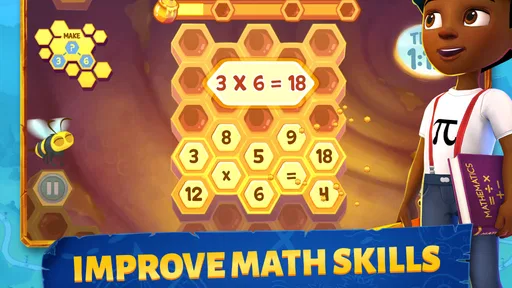
From the get-go, Adventure Academy pulls you into a vibrant 3D world filled with quests, challenges, and interactive lessons. The app covers a broad range of subjects, including math, science, reading, and social studies. What's cool is that learning doesn't feel like a chore here. Instead, kids embark on quests that require them to use skills they've learned to solve problems and unlock new levels. It's like school, but way more fun!
Engaging Graphics and Gameplay
The graphics are top-notch, making the gameplay visually appealing. Your child can customize their avatar and explore different areas of the academy, meeting other players along the way. The social aspect is pretty neat too, as it allows kids to interact and collaborate on quests. But don’t worry, there are parental controls to ensure a safe experience.
Variety of Educational Content
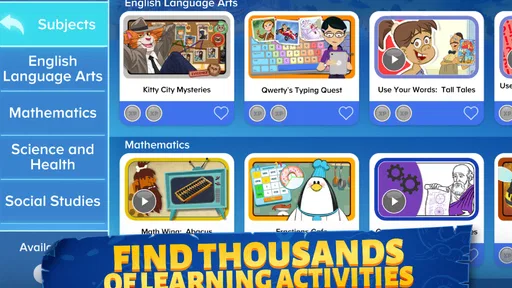
One of the standout features is the sheer variety of content. Whether your child is a budding scientist or a bookworm, there's something for everyone. The library is stacked with books, and the science lab is packed with experiments. Plus, there are video lessons and interactive games that cater to different learning styles. It’s all about making education accessible and enjoyable.
Ease of Use
Setting up the app was a breeze. The interface is intuitive, so kids can navigate without feeling overwhelmed. There are tutorials available to guide them through the initial stages, and honestly, it’s not long before they’re off on their own adventures. The app is available on both Android and iOS, so getting started is as simple as downloading and logging in.
For families weighing the practical details, it is a free education app with optional in-app purchases, and the content rating is Everyone. The current Android version is 1.065.002 and supports devices running Android 5.0 or later. The app has a 4.4 average from around 28,000 ratings, with more than a million installs. Those figures suggest it has found a substantial audience, though they cannot tell you whether its open-world style will suit your particular child.
One question parents often have is whether the child needs to be guided throughout. The world is designed to be explored independently after the initial orientation, but I would still check in, especially early on. A quick look at what the child chose to do can help you decide whether they are finding the content or getting sidetracked by the environment. Treat that as shared setup, not constant supervision: the aim is to help them build a routine they can manage themselves.
Parental Controls and Safety
As a parent, safety is always a priority, and Adventure Academy doesn’t disappoint. The app includes robust parental controls, allowing you to monitor your child’s progress and interactions. You can even set time limits, ensuring they don’t spend all day glued to their screens. It’s a relief knowing that while they’re exploring and learning, they’re also in a safe, controlled environment.
Because the experience includes interaction with other players, I would take a moment to review the available parental settings with the child instead of assuming the default setup matches your household’s preferences. Explain what rules you expect around screen time and online interaction, then revisit them after the child has used the app. The presence of controls is useful, but it does not remove the value of age-appropriate conversations and ordinary parental judgment.
Subscription Model
Now, let’s talk about the cost. Adventure Academy operates on a subscription model, offering monthly and annual plans. While some might balk at the price, considering the extensive content and educational value, it’s a worthwhile investment. Plus, they often have promotions and discounts, so keep an eye out for those!
The listed in-app purchase range is from $9.99 to $79.99 per item, so I would check the purchase screen carefully before committing and make sure the adult responsible for the device handles any payment decisions. “Free” describes the download, not a promise that every part of the experience is available without payment. If you are unsure whether your child will keep using the app, begin with a short trial of the free access and look for sustained interest before spending; avoid treating a single excited session as proof of long-term value.
Another practical question is whether it works for a sibling group. The broad mix of activities may appeal to children with different interests, but ages and confidence levels still matter. A younger child in the intended range may need help understanding where to begin, while an older one may want more focused or challenging material. I would have each child try it separately at first, then see whether they can share a device or routine without one person taking over the exploration.
It is also worth thinking about device readiness before making it part of a daily routine. On Android, the stated minimum is version 5.0; beyond that, the experience depends on how comfortably the app runs on the particular device. If the world feels slow or awkward to navigate, that friction can undermine the very appeal that makes the format useful. A brief test on the device your child will actually use is a sensible way to decide whether it belongs in your family’s routine.
In conclusion, Adventure Academy is more than just an app; it’s a comprehensive learning platform that turns education into an exciting adventure. Whether your child wants to solve math problems, read books, or conduct science experiments, this app has it all. If you’re looking for a way to make learning fun and engaging, Adventure Academy is definitely worth a try.
So, what are you waiting for? Dive into the world of Adventure Academy and let the learning adventures begin!
Pros
- Engaging educational content for kids.
- Interactive learning through games.
- Wide variety of subjects covered.
- Safe and controlled environment.
- Encourages independent learning.
Cons
- Requires a stable internet connection.
- Subscription needed for full access.
- Limited offline features.
- Some content may seem repetitive.
- Not ideal for older teens.
FAQs for Adventure Academy
What is Adventure Academy?
Adventure Academy is an engaging educational app designed for kids aged 8-13. It combines learning with fun, offering a virtual world where children can explore subjects like math, science, reading, and more. The app is accessible on both Android and iOS devices, providing a rich, interactive experience that encourages learning through play.
Is Adventure Academy safe for kids to use?
Yes, Adventure Academy is designed with children's safety in mind. It features a safe online environment with parental controls and privacy safeguards. The app offers a secure chat feature where kids can interact with friends, but parents can monitor these interactions to ensure a safe and educational experience.
What subjects are covered in Adventure Academy?
Adventure Academy covers a wide range of subjects including mathematics, science, language arts, and social studies. The app offers thousands of activities, videos, and educational games tailored to various skill levels, allowing children to learn at their own pace while keeping them engaged with interactive content.
Are there any subscription fees for Adventure Academy?
Yes, Adventure Academy operates on a subscription model. While it offers a free trial period, continued access requires a monthly or annual fee. This subscription provides unlimited access to all educational content, ensuring your child can explore and learn without limitations. Pricing details are available on the app's download page.
Does Adventure Academy require an internet connection?
Yes, Adventure Academy requires an internet connection to function. This is because the app continuously updates its content and allows children to interact with other users in real-time. A stable internet connection ensures seamless access to all features, including multiplayer games and live events.


